Features
PDFTuck does one job: get a PDF under a size limit on an Android phone. This is everything it does, and what it doesn’t.
Choosing the size
- Target size in KB or MB
- Presets for 200 KB, 500 KB, 1 MB, 2 MB, 5 MB and 10 MB, or any custom value.
- Quality modes
- No strict limit? Choose High quality, Balanced or Smallest file instead.
- Decimal units
- 1 KB is 1,000 bytes, so the portal’s number is safe to type as it is.
Compressing
- A bounded search
- Up to seven quality settings are tried; the best-looking one under your limit is kept.
- Measured results
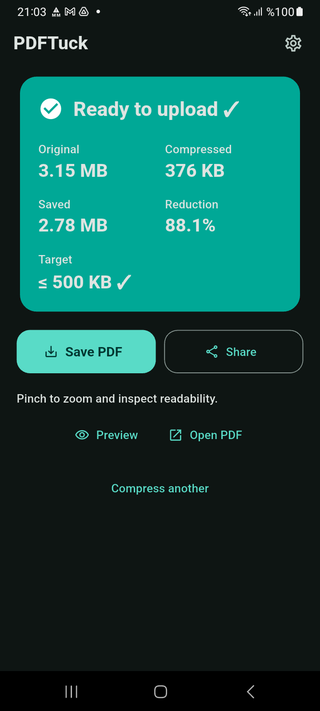
- “Ready to upload ✓” appears only when the real file size fits.
- Honest misses
- If a limit can’t be met safely: “Best readable result”, with the option to use it or try stronger compression.
- Progress and cancel
- See that it’s working, and stop it at any time.
After compressing
- Before and after
- Original size, new size, space saved and reduction in percent.
- Preview
- Page by page, with pinch to zoom, before you save.
- Save as
- Android’s save dialog, with a suggested name like report_500KB.pdf.
- Share or open
- Send the file to any app, or open it in your PDF viewer.
- Original untouched
- A new file is written; the PDF you picked is never changed.
Privacy and access
- On the phone
- The PDF is compressed on the device and never uploaded for compression.
- Offline
- Selecting, compressing, previewing and saving need no connection.
- No account
- Nothing to sign up for. No storage permission: you pick the file in Android’s own picker.
- Free, with ads
- Google ads: a start-screen banner and an occasional full-screen ad between files. No purchases.
Comfort
- English and Turkish
- The interface follows your phone’s language.
- Light, dark or system theme
- Your choice is remembered.
- Android 7.0 or newer
- Phones only; there is no iPhone version.
What PDFTuck doesn’t do
- Guarantee an exact size. It aims under your limit and tells you when it can’t.
- Keep everything intact. Pages may become images; searchable text, links, form fields and signatures may not survive.
- Open password-protected PDFs.
- Merge, split, edit, convert, sign or run OCR.
- Compress several files at once.
- Run on iPhone, on the web or on a computer.
PDFTuck is in closed testing and is not yet publicly listed on Google Play.
Email to join the test